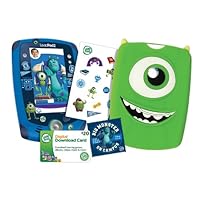


THE TABLET ITSELF With a 5" screen that's larger than my iPhone 5, but smaller than some Samsung cell phones, the screen is a good size for kids to explore and play on. The display is bright, the sound is very clear on the unit, and the chunky feel of the unit makes it great for younger kids. The plastic is durable and will definitely survive a drop. Things I really like about the tablet itself is that the stylus is tied to the unit, so there's less chance of it getting lost, and that the battery accesses are not screwed down. I hate having to find a screwdriver to open the battery case! The stylus doesn't always stay in the stylus holder as it's held in magnetically, but since it's tied to the unit, it all good. The touchscreen of the LeapPad is also very responsive. Added bonus there is a motion detector in the unit, so it does respond via movement like some iPad/iPhone games.
CAMERA The resolution of the camera isn't great, but it keeps my kids happy. With a camera on the front of the unit, and on the back of the unit, it works similarly to an iPhone. The resolution is far from printable, nowhere near the resolution of my crappy old cell phone, but boy the kids LOVE this thing. I have to note that the camera lenses are kept fairly safe as they are "sunk into" the unit, unlike your standard iPhone or iPad camera.
APPS This unit does comes with 10 apps, but this doesn't mean that it comes with 10 apps that your kids will play with. The apps include Pet Pad, Camera, MyStuff, My Books, Music, Calculator, Calendar, Clock, Notepad, and one app of your choice. This is where things irritate me about the LeapPad. There's only 2 apps your kids will be able to play with off the bat. The remaining apps are stuff that your kids probably won't play with. To add insult to injury, most of the good apps in the app store are $20+ EACH. I did find a few $5 apps, I had to seriously search for them. That said, the gift card you have will probably not go very far. This is where the iPad seriously beats out the LeapPad. I've downloaded a good number of educational games for my kids on the iPad that cost $0.99 or are free. You'd think LeapFrog would offer a few cheaper options.
-Pet Pad: Great game for the kids. It's like a Tamagochi that won't die on you. You can feed, clean, play, and learn with your pet. There is a writing game
included in the Pet Pad that helps kids learn how to write letters correctly. You can also "earn" treats for your pets.
-Camera: The kids LOVE this app. They can take videos or pictures. There's also picture editing software, so kids can add stickers/draw on/manipulate photos.
-MyStuff: This is a folder based app that has links for your pictures, videos, stories, and art. There's no play involved here.
-My Books: If you haven't paid for any books, you won't have anything in here. Unfortunately this LeapPad comes with ZERO books. You'll have to pay for them.
-Music: If you haven't paid for any music, you'll have 4 silly songs included here only. You'll have to pay $5 to download the MP3 player if you want to load
any of your kid's MP3 collection on there.
-Calculator: Works like a calculator. Nothing too special here.
-Calendar: It's a calendar. If you click on a date, it will tell you the date. You can also enter a note on a date. It would make a good diary for kids,
however, my kids don't use it much.
-Clock: This features a digital and analog clock face. It's impossible to tell the time to minute on the analog clock face as there are no minute marks.
There's also a stopwatch button, if your kid wants to time someone.
-Notepad: This is a digital Post-It Note. My kids like to pretend they're writing letters here.
-App of Your Choice: You get to pick one out of 3 apps LeapFrog chooses for you. These are 3 generic apps none of the Disney/Dreamworks/etc apps that your
kids really want.
There is also a "Sneak Preview" app that is a running commercial for your kids to want more apps. I wish I could delete this off the LeapPad. NOTE: I was able to get 2 free apps Alphabet Stew and the eBook "The Book of Super Awesome Stuff" by googling "Free LeapPad2 Apps". You can enter these codes from your parent control panel on your computer and get them downloaded to the LeapPad.
The Book of Super Awesome Stuff (e-book): 5813 1140 1518 1413
Alphabet Stew (game): 5813 0790 4610 4973
POWER SUPPLY This thing runs on 4AA batteries. This doesn't seem like a lot of batteries, but if you have a kid who plays a LOT, you'll be plowing through a lot of batteries. The batteries last anywhere between 7-9 hours according to LeapFrog. There is a port where you can plug in AC 9V power, but unfortunately this package does not come with the charger unit. I lucked out because I have a Bose charger (for the SoundLink Mini) that just happens to fit into the LeapPad. Check your other electronics in the house you just might luck out. If given the choice, I would thrown down the LeapPad2 Power (priced at $99) to get the rechargeable batteries and power supplies.
THE MONSTERS INC. ADD ONS The Mike Gel case fits beautifully on the LeapPad, and has a nice smooth matte feel about it. It doesn't seem to attract much dirt to it either, and has managed to stay clean for the past week. It's very soft and is easily applied, although I do wonder about the long term use of this case. The screen cleaner is a thin piece of cloth...my kids have already lost it. The stickers are nice, but not really necessary. I would have rather seen a battery charger instead of these silly stickers. The add on bonuses for the Monster Inc. pack were nice, but for almost $30 more, I would pass on these add ons unless your kids are really into the movie.
While it's a great toy overall, unless your kid is really into Monsters Inc, it may be a better deal buy to get the original LeapPad2. The only real differences between this unit and the original LeapPad is the case cover, which is blue and features some of the Monsters Inc characters, the gel skin that's shaped like Mike, the stickers, and the $20 gift card. Since I already own an iPad, I can safely say that in the long run that the iPad with a good protective case would be a more logical choice to get your kids. While the price tag is much higher initially, after buying a few apps, the LeapPad would cost just as much. Along with the lack of WiFi, web surfing capabilities, and more advanced apps, it's only a matter of time before we shelf the LeapPad and go back to fighting over the iPad with the kids. Recommended up until about age 6 or 7...maybe. I'll let you know if the kids are still playing with it then.
Click Here For Most Helpful Customer Reviews >>
Customer review from the Amazon Vine Program This LeapPad2 is just amazing. The Monsters theme is really appealing to children (and adults). I especially like that the case has textures, which makes it much easier to hold on to.The most important reason I love LeapPads is because of their educational apps. One of the amazing benefits to any of the LeapPads is the number of apps that come preinstalled. There are plenty of games to play enough to keep a child challenged for months. I see a lot of very small children playing with iPads and as an educator; I'm not sure what benefit they have. Obviously once children are in the upper elementary, iPads become valuable tools to use for education. But up until that point it seems like the educational adaptation is pretty hit or miss. The teenagers who have been in my house the past few years are crazy in love with their iPads but they are playing games.
I now regret all of my complaints about the lack of color involved in the Leap Pads. The green or pink and maybe a lavender cover made it difficult to tell which LeapPad was which. There will be no mistaking that this one is mine. :D. Actually, when the children are playing, they have 15 minutes on one device and then they all switch because not all of our LeapPads have the same content. Then they go out to play because it is still summer here and beautiful. But now it is easier to make sure they have switched LeapPads because they are not all green.
The only complaint I have left is the inability to download purchased apps onto more than one LeapPad. The LeapPad Ultra did allow me to connect and download apps I had purchased previously.
I did have some runarounds with this particular LeapPad. I have an account with a huge number of LeapFrog products attached to it and sometimes they are easy to connect and sometimes not. This one kept telling me it needed an update and then that it already had it, then that it didn't, then that I needed to restart my computer.... Not one of my favorite games. Then I discovered that the update wasn't downloading because before the needed 5 minutes, the LeapPad2 was turning off because it wasn't in use. I just kept doing what it wanted until it downloaded it. In the past, I have bought as many as 6 of a single kind of LeapFrog hand held device and some of them update and some of them play the Update game. It's always interesting to see which will do what.
Another thing that is interesting about what is probably a new lineup for holiday sales is that this one is not much more than the regular LeapPad 2s have been until recently (usually $99). This Monsters U version adds a lot of parts to it and comes with a $20 digital download card.
If you are a first time buyer, you may be interested in buying an LeapFrog App Center Download Card (works with all LeapPad Tablets, LeapsterGS, Leapster Explorer and LeapReader). These fluctuate in price so I leave them in my cart and generally buy them whenever they go below the $16 mark. I've heard other people say they don't buy until it goes below $12 but I have never seen that price.
Another lifesaver is the LeapFrog AC Adapter (Works with LeapPad2, LeapPad1, LeapsterGS Explorer, Leapster Explorer and Leapster2) that works for many of the devices including the LeapPad2s
I had never seen the LeapFrog LeapPad2 Recharger Pack (Works only with LeapPad2) for the LeapPad 2 but this is a necessity. My rechargables never seem to last very long and the LeapPads always end up with regular batteries in them. This is one of the ways that the shut-off is so wonderful. I have also seen that there is a new LeapFrog LeapPad2 Power Learning Tablet Green (includes rechargeable battery $40 value). These are great options. I plan to add one of theRecharger packs in short order and will probably get rechargers for all the children who have LeapPads as a stocking stuffer. They get really excited about batteries.
Yes, I admit it. I love LeapPads.
Best Deals for LeapFrog LeapPad2 Disney/Pixar Monsters University Varsity Edition
Customer review from the Amazon Vine Program That's what the kiddos in my special education class have to say about the LeapPad 2 Monsters University Varsity Edition Bundle. The school year is off to a great start now that I have this fantastic device. It is used as a "free time" activity that has my students rushing to finish their school work quickly so they can be the first to use it. We also have an iPad in the class, but since this is the 'newest" and most colorful game we have all the kids want to play it. Now, you must remember that I am talking high school aged students with disabilities here. It is an excellent educational tool that teaches and reinforces basic skills. The apps are a little on the spendy side, but I am always willing to spring for activities that help my kids.The only downfall is that it doesn't have a rechargable internal battery. It requires 4 AA batteries, but they do seem to last quite a while, I haven't had to replace them yet, after 2 weeks of almost non-stop play time throughout the day. The students also love the camera capability. They have enjoyed taking "selfies" and also photographing their classmates. The picture quality isn't very good, but it is good enough for the kids..they seem to love it. Overall, this is a a great product for a great price. I think every special education classroom should have access to a LeapPad2.
Honest reviews on LeapFrog LeapPad2 Disney/Pixar Monsters University Varsity Edition
Customer review from the Amazon Vine Program I really love Leap Frog toys and this is another great one! The bundle is great! It includes a rubberized cover, graphics on the tablet itself, stickers, a screen cleaning cloth, and a $20 download credit. It also comes with 8 preloaded apps and one game choice for free. The $20 download card will get you only 1 or 2 additional games b/c of the pricing on the leapfrog webpage.The games and apps are great-they are age appropriate for 4-7 year olds. They are fun to play, and my 4 year old loves to play them. A lot of the games focus on learning letters and numbers. You can also choose to download more apps that focus on other educational topics depending on age and education level.
The tablet itself is SUPER easy to set up and has the ability to set up 3 different profiles, so you can share this with multiple kiddos. It's thicker than tablets for adults, so it's nice a sturdy and easy for small hands to hold. The touch screen is very responsive whether you use the stylis or not. The stylis also is connected (via a small string) to the tablet itself so you don't lose it).
The reason I gave it 4 stars instead of 5 stars is b/c it DOES NOT HAVE A BUILT IN BATTERY-it takes 4 AA batteries that are NOT INCLUDED in the bundle. It's just a bit annoying b/c it seems like something that would be easy for them to put in there, b/c lets face it, the last thing parents need is yet another toy that needs more batteries.
Overall, this a great toy, I would recommend this to anyone who is looking for an educational toy for a young kid (about 4-5 is the youngest I'd go with this b/c of the games).
Find helpful customer reviews and review ratings for LeapFrog LeapPad2 Disney/Pixar Monsters University Varsity Edition
Customer review from the Amazon Vine Program This set is just too cute! There are a lot of details included with the extra accessories. I'll talk about the basic apps first, and then move on to the accessories. If you already know about LeapPads (especially apps) and just want to know about the extras, feel free to skip the first section!LEAPPAD APPS
One of the nicest things about this set is the included gift card for apps. While it's not going to get you many--it can buy two in the normal price-range--it's helpful in getting you started since there aren't many built-in apps--and it's more open-ended than the fact that you typically have a choice of one in three free apps. You'll also get that free downloadable app from a choice of three, as is typical for LeapPad purchases. The ones I was offered to choose from (I'm not sure if this will vary) were: Scout and Friends and You, Solar Taxi, and Squirrel Summertime Games. Note: From my experience, the free app can only be installed on the ONE new LeapPad, so make sure whatever game you choose is one only the child who uses this device wants, as it cannot be shared with other household members. (Purchased apps can be on more than one device, though, and that includes the ones you pick out with the app card.)
Speaking of which, be sure to look around for the app card! I thought it would be in the front, where it looks like there's a cardboard sleeve for it. Instead, it's packaged behind the LeapPad unit.
Here's a bit about the apps that are included:
Art Studio App--This is like a little Paint program. Unfortunately, this is the app where it's most noticeable that there's a response delay with the stylus. Drawing needs to be done somewhat slowly.
Camera--This is a toy-quality camera and video recorder. It can take photos from the front or back.
Cartoon Director App--Kids can make mini-movies, and can use photos of faces to personalize the characters. Motions are limited and the movies are mostly narrative, but it's still a great way to exercise creativity.
Learning Songs--A few LeapPad educational songs.
Pet Pad--This app helps teach kids how to write letters with the help of a personalized pet. Letters correspond with pet tricks. There are also activities, including bathing, feeding, and making the pet "fly" to collect balloons by shooting it in a slingshot.
Photo Lab--Photos can be manipulated and edited.
Utility Apps--There are also some new included apps that don't appear on earlier versions of the LeapPad2. Those are:
* Calculator that can accommodate eight digits. It adds, divides, multiplies, and subtracts.
* Calendar that has "stickers" for marking important dates, and will also allow for "typing" in notes that get added to it as sticky notes.
* Clock/stopwatch, with analog and digital readouts, along with a count-up stopwatch option.
* Note pad, where short notes can be "typed" onto a sticky note. I'm more impressed with this app than the one on LeapPad Ultra, where they forgot an apostrophe key!
ACCESSORIES
The Mike-themed gel skin is really cute, and so different from the typical ones you can buy. He's even wearing his retainer, and the top is complete with horns. I like this gel skin better than the other official LeapPad ones. It's more pliable plastic, making battery changes easier. I have a difficult time changing the batteries on a LeapPad2 with a less pliable blue gel skin. This gel skin also has a bit more of a texture to it (it's not shiny-smooth).
The seven wallpapers are on the LeapPad (built-in backgrounds), so they're not to decorate the physical LeapPad unit, but there are also two sheets of stickers that can be put on the outside of the LeapPad or (in my opinion!) used on something else. The "frame" around the LeapPad2 is already decorated with a Monsters University theme, including Mike on the left and Sulley on the right.
The cleaning cloth is really basic, but it works well. It features Sulley in the center, along with the words: "Big Monster on Campus." The edging is "pinked" (pinking shears/zig-zagged).
Although this is more expensive, overall, than a basic LeapPad2, the few extras--the cleaning cloth, gel skin, and $20 app card--definitely make it worth a look to anyone considering a LeapPad2. (Although the two sheets of stickers are nice, too, they're not something I would personally want put on the LeapPad.) The blue and lime green colors in the theme are eye-catching and fun! As with any LeapPad product, though, I would recommend this set only if you're willing to spend more to add additional apps.


No comments:
Post a Comment