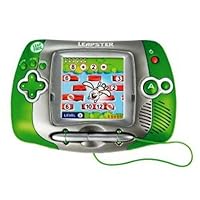


LMax: I didnt buy the LMax, but the rep at Leapfrog said the only difference with the LMax is that it can plug into a TV for dual screen gaming (with LMax titles). I did not care about this functionality since I have 2 kids and didnt want them fighting over who got to use the TV. Plus I cant imagine the graphics looking very good on a TV. You can use Leapster titles on the LMax and LMax titles on the Leapster (so the number of titles are the same).
Old Leapster: This one is the larger version that more of a "triangular" shape. The Leapfrog rep said the internal components are the same, as the new one. The differences here are; Larger size, Heavier, Larger Screen and more built in games. The Larger Screen and more built in games are nice. The additional internal games are matching letters/numbers, some shape games, and some reward system for points earned in those other games. The pen is also slightly larger. The battery compartment is vastly different on both so beware of rechargable battery pack that you purcahse. Here are the stats:
Weight: 14.5 oz
Width: 7 5/8" (largest part) 4 1/2" approx (shortest part)
Height: 5 1/8" (largest part)
Thickness: 1 3/4" (largest part)
(this is hard to measure since its more tiangular shaped)
Screen Width: 2 3/4"
Screen Height: 2 3/4"
New Leapster: This is the more "square" leapster. It is much smaller but so is the screen. There are less internal games (see the additional ones that are excluded above). There is also a new internal activity but its more of a commercial with other games and characters in those games (so mostly useless). The thumbpad looks like it might be easier for small children since its more of a " + " shaped pad with more unique up, down, side action. The old one has more of a circular thumbpad so I might see smaller children hitting up direction as well. Because the shape is smaller theres more room when you put this one in the Leapster case (you probably could use the case with a game cartridge still in the Leapster which a previous reviewer said you cannot do with the older large leapster. Here are the dimensions:
Weight: 10.9 oz
Width: 6 3/8" (largest part)
Height: 4 3/8" (largest part)
Thickness: 1 3/4" (largest part)
Screen Width: 2 1/4" (approx)
Screen Height: 2 1/4" (approx)
Ok thats probably more information than anyone wants to know but you're on your own on the choice. We are planning on giving this to our children on Christmas but right now I think we are leaning toward the smaller one (as it will probably be easier for our daughter and her small hands) but this opinion could change before Christmas.
Good Luck and Merry Christmas (or other celebrated holiday).
Click Here For Most Helpful Customer Reviews >>
Okay I thought I was doing SO great. I found the color pixter in a store and bought it for my 6 and 5 year old. I bought all the color cartridges also. I thought I was done xmas shopping. Then yesterday at the store. What do I see but the Leapster. I almost felt ill. I didn't know what to do. So I went home and opened the pixter and put my batteries in and started to play. But let me tell you that toy is in that box so not even houdini himself could get it out unless he has a screwdriver. Yeap you need a screwdriver. ugh. First off the directions aren't that great. I was playing and trying to figure out the tool bar. Kinda hard. Then when I was trying to put clothes on Barbie they would land on her head and I would try to bring them down and the kept adding the same dress over and over onto the screen. I'm a smart women and I had a real hard time with this stuff. Then I was trying to do other things and theres NO education value at all to this. Expect if you like to doodle and draw. So off I went to buy leapster. I was thrilled I opened the box. NO SCREWS. It came right out. it turned on and its having me count, do my abc's learning money (spongebob cartridge) I thought I was going to have a hard time choosing. No way leapster is my gift to the kids. They will love it. There are more cartridges in color, like Dora and a baseball one and how to write. Leap frog explains everything you need to do. It has an AC adaptor if you want to buy one. You can put headphones in. The screen has adjustment. Pixter does not and its too light. Hard to see the object. Okay so if you hawing and hemming let my goof be your blessing! Its great. The only thing is that it says up to age 8. I really hope they make cartridges pass this age. Because I'm tired of buying leap baby, leap preschool, leap pad, leap pad plus writing. We need something to go with our child for a while. Please let it be this its so much more educational then a game boy! Thank you leapfrog you never disappoint. Back tommorow I go to return pixter and to find more leapster cartridges!!!!! Signed the leapster addict! j/k :) Merry shopping to ya all!Best Deals for LeapFrog® Leapster® Learning Game System - Green
My children ages three and four already own just about every Leap Frog toy out there. I decided to purchase the Leapster for Christmas, because they have started to get into video and computer gaming and also enjoy their Leap Pad very much. I test ran the Leapster yesterday and I was really impressed. The color monitor turned out bigger than expected and the graphics are great. Everything is easily accessible thanks to the touch screen. The whole concept behind the product is definitely very similar to all the other Leap Frog items. The same voices and characters as in the Leap Pad books are used. Overall, the system is more than worth the money. I already ordered additional cartridges (Dora, Kindergarten) and can't wait until more will be available. Happy Holidays!Honest reviews on LeapFrog® Leapster® Learning Game System - Green
I bought my leapster last Christmas and my kids have loved it almost too much. It is constantly being played with. After so much use I wasn't surprised when it started to have a few gliches after 6-7 months of such heavy use, but I decided to call Leapfrog and see if there was anything I could do. He told me to take the cartridges and to dip a Qtip in achohol (I used a table knife covered with a rag dipped in rubbing achohol) and clean the inside of the cartridges, then put it in and out of the leapster. I cleaned my cartides and it has worked perfectly since. The collection of dust inside just needs to be cleaned out and then it worked like new again.I have all the cartridges and my kids favorites are: First Grade and Kindergarten (These are just plain fun to all my kids from PreK to 5th grade they like the arcade style and the race car driving that is rewards to learning.) My girl who loves drawing plays Mr. Pencil Drawing program a ton, and my Preschoolers favorite is the Disney princess because she is obsessed with Princesses, and of course the Letter Factory. She is starting to read in Preschool and I give total credit to the Letter Factory and Word factory games. We just got The Incredibles and Junie B cartidges and of those 2 of course The Incredibles is winning and is being played a ton (but what do you expect with the movie as cool as it is :) Mrs. Stretch does a Spelling game Dash does place value like if you have 2354, where does the 3 go, and the other 2 do 2 digit math and teach times tables. Then you are given key cards as you do the game. The family works cooperatively getting through the maze as you get more key cards. I really like the leapster, and my favorite thing is that I can say to my kids its your night with the leapster the sooner you get in bed the sooner you get to play, and they will climb in bed at 7:00 and play till 8:30-9 until I say lights out and make them turn it off. And they all keep track of whose night it is to play. I also love that my little girl is really getting good control of the pencil (hand eye cordination) and that she is just barely 4 and is already putting words together. I love it.
Find helpful customer reviews and review ratings for LeapFrog® Leapster® Learning Game System - Green
When I first heard about this toy, I thought it would be another 'educational' toy designed for yuppie parents to think they're doing the best by their kids. I admit it. I was wrong. I saw a commercial for it, and liked what I saw. I read reviews here on Amazon, still skeptical, but I bought it anyway. I couldn't even wait for Christmas. I gave it to my five-year-old son the day I bought it. Wow. He loved it. It was exactly what I've been looking for an educational handheld that involves learning instead of violent video games (I'm a no-commercial TV, limited movies and media mom). Best of all, he was able to figure out how to use it himself without needing my help at all. This may seem a small thing, but any parent who has had a kid ask how to do something when driving or cooking dinner understands the beauty of this concept. Great screen, graphics, etc. Volume control and headphone inputs (yahoo!). Even a great pause button. After trying to find great educational games for the Game Boy Advance, it's nice to see a product that fits our household's needs and values.
No comments:
Post a Comment