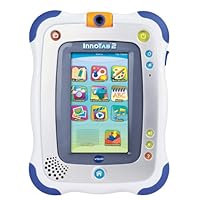


Both have the same screen size (2 ½" x 4 ½"), or 5" if you're measuring diagonally.
Both require 4 AA batteries (not included).
Both use a stylus.
Both have a cartridge port for additional games, and uses purchased apps.
Both have an age requirement of 3-9 years. VTech's Amazon page says 4-9 years, but the box and VTech's website state 3-9 years.
Both have a camera.
Both have additional accessories you can buy like gel skins, cases, rechargeable batteries, ac adapters, and headphones. UPDATE: the InnoTab doesn't have a gel skin accessory, just a screen guard you can purchase. LeapPad you can purchase both separately.
Both can be personalize for up to 4 players.
Both have eReaders, MP3 Players (InnoTab's is free, LeapPad's is an additional $3.75 through their App store), art studio, and most of your basic themed books and games.
Both have a mic and volume control.
Some people like to creatively take the tablets out of the box for setup before handing to a child as a gift. LeapPad2 was a bit difficult, but doable. The InnoTab2 is a bit more of a challenge; just use sharp scissors to break the tape and fold out the box carefully.
Both have a parent tracker that allows parents to track their child's progress and success playing a game.
HOW ARE LEAPPAD2 AND INNOTAB2 DIFFERENT?
The LeapPad2 is smaller. Actually it looks like with InnoTab2 they were the same size, but they surrounded it with an additional ¼" layer of decorative plastic with rubber corners to help protect it from a fall. For small hands I find it cumbersome. Plus it makes the screen appear smaller. But I do like the rubber corners.
The LeapPad2 has a front and back camera, but the InnoTab2 has only one camera that rotates (creative idea!)
The battery compartment on the InnoTab is easily accessible. Just slide a switch and it opens the compartment. I prefer LeapPad's more secure sliding feature. But if you're using a gel skin on either that helps prevent access.
The LeapPad2 only comes with one stylus, the InnoTab2 comes with two; always a plus in case you loose or break one. The InnoTab2 uses a secure rope loop but I looked everywhere in the packaging and there wasn't one! Also, InnoTab's stylus is pure plastic, flat, and slippery. LeapPad2's stylus is what you're more used to seeing (round like a pencil), and not slippery to hold.
LeapPad2 has 4GB of memory, InnoTab2 2GB... but, you can use an SD card to add an additional 32GB of memory. That's impressive! (SD card not included). I am finding that 2 or 4GB of memory is more than enough for our needs.
LeapPad2 I had to setup using their installation CD before I could play it, but the InnoTab2 you can start playing right away.
VTech has some interesting new apps that come with the InnoTab2 right out of the box, like a calculator app, calendar, notes, and clock. I don't know why, but I find that nice. I couldn't find those apps in LeapFrog's app store.
InnoTab2 has a tilt sensor like an iPad or iPhone and will tilt the screen if held horizontal or vertical. LeapPad2 does not have this feature. UPDATE: LeapPad2 does have this feature, but only with certain apps. For instance, the main screen (home screen with apps) does not tilt like the InnoTab2 will. The InnoTab2 will tilt with just about everything, but the LeapPad2 is limited to certain apps.
LeapPad2's store for purchasing apps is easily accessed. I went to their website and could browse their app selection right away. On VTech's website I couldn't find the app store to save my life. All I could find were the cartridges for sale, which are comparable to LeapFrog's prices.
InnoTab2 has buttons for brightening or dimming the screen, but don't expect much, there's only four bars and it doesn't make a lot of difference.
InnoTab2 has a "?" button that allows you to hear instructions again, or find out more information about an app (nice touch!).
InnoTab2 comes with a manual. LeapPad2 does not.
InnoTab2 has a "kickstand" for standing the tablet up vertically or horizontal.
So what's the overall review?
Honestly, I feel the InnoTab2 is just what the original LeapPad was: s-l-o-w. InnoTab2 takes 37 seconds to reach the app home screen. LeapPad2 takes 21 seconds. With LeapPad2 it takes almost 5 seconds from the time you select an app for it to start. It takes InnoTab2 almost 8 seconds. It just feels like there's a lot of "loading" going on with the InnoTab2. I'm nit picking of course, but it makes a difference to me.
Also, my son just turned 3. When he tries to swipe the screen to the next page he sometimes touches an app, which causes it to load. He then has to wait for it to load before he can go back to the Home screen and try and swipe again. This happened to me a lot, too. If I lay my finger down for just a fraction of a second the InnoTab2 thinks I'm selecting an app instead of swiping. So you have to be careful to swipe in an empty space; my 3 year old isn't capable of that when the screen is filled with apps. The LeapPad2 just uses arrows to touch at the bottom of the screen.
Overall I feel the InnoTab2 is really not geared for 3 year olds (just like the original LeapPad wasn't either). The screen isn't as bright and crisp as the LeapPad2, and the tablet doesn't feel as solid in my hands.
LeapPad2 is currently $20 more; I'd really suggest getting a LeapPad2 over an InnoTab2, especially if you have a 3 year old: Older kids probably not that big of a deal, just a matter of preference. The included apps seem geared toward older kids anyway, whereas LeapPad2 apps are more 3 year old friendly with their PetPad tracing alphabet game, and the overall designs of the included apps more basic. For example, the art studio in InnoTab2 has like a million color choices, but LeapPad2 just has basic colors to choose from.
InnoTab2 is compatible with LeapPad2 in education, but I feel like the tablet needs more work.
Click Here For Most Helpful Customer Reviews >>
The new Innotab 2 came in this week and my kids won't let go of it anymore!Unlike the description above you can add up to a 32GB memory card. With plenty of apps you can download from v-tech (e.g. learn to write by tracing letters etc.) there's absolutely nothing a kid can't learn.
My 2yr old enjoys the storybooks while my 5yr old goes through a whole bunch of games. It's not games like on a Playstation or so. So far to my knowledge there are no action games available it's meant for learning!
My children had the Innotab 1 prior to this. And although they were playing quite rough with it at times it's still in great shape (I would recommend a screen protector though). The only bad thing I can say about it so far one load of batteries only lasts about 6 hrs. So rechargables (unfortunately it won't accept all brands) or the wall adapter are nice to have.
Compared to the Leapfrog I prefer the Innotab since you can insert a memory card and load up your own movies from DVD's. Just copy and install.
Best Deals for VTech InnoTab 2 Learning App Tablet - White
Customer review from the Amazon Vine Program My daughter has the Leap Pad2 and my son now has the InnoTab, so it was nice to compare them side by side.Pros for the InnoTab: I love the camera design. The Leap Pad2 has two cameras, one in the front and one in the back. InnoTab's design has a rotating camera, so you can switch it from front to back. My son says this adds extra coolness, which I must say I agree, it was a nice touch. This also has a neat photo editing lab where the kids can add in stamps, borders and change colors. I'd say this is a tie for Leap Pad/InnoTab. Sound quality is good. I like the rubber bumpers on the InnoTab. Both products say they are for ages 3-9, but I think the InnoTab is actually geared towards the younger crowd. That being said, if my son happens to drop the InnoTab, I feel like it has more protection with the bumper. I also like the wide variety of games and stories you can get on the InnoTab. We've had Leapster products for so long, and it seems like they are just releasing the same game in a different format (Leap Pad, Leapster, etc.) With the InnoTab, it's a whole new set of things to choose from, including some choices Leap Frog does not have, like Hello Kitty.
Cons: The screen size is the same, but I think the clarity is better on the Leap Pad2. Also, as another reviewer has mentioned, there's a longer lag in loading on this product as compared to the Leap Pad2. It's not as noticeable to my younger child, but my six year old gets frustrated at times waiting for each game section to load. I also think the screen is more responsive in the Leap Pad2 some games require some precision in tapping just the right spot for an answer, and we've had times with the InnoTab where my son will press the correct spot on the screen, but nothing will happen unless he repeatedly presses or moves a fraction over to the left of the correct answer.
Overall, InnoTab is a solid learning device, and I think it would be a fantastic first "tablet" for younger kids. If you have a child at the older end of the recommended range, you might want to consider the Leap Pad2.
Honest reviews on VTech InnoTab 2 Learning App Tablet - White
My 3 year old son loves this product. He hasnt put it down yet. The only down side of this product is that it consumes batteries like crazy. We went through two sets of 4 batteries in one day. I highly suggest that you purchase a few sets of rechargable batteries and the ac adapter for you to plug it into the wall. That is unless you have an unlimited supply of batteries at your consumption.Find helpful customer reviews and review ratings for VTech InnoTab 2 Learning App Tablet - White
My daughter had an iPad. Had is the operative word in that sentence. You see, she allowed My Little Guy to play with it when he was a baby and he accidentally dropped it on the tile floor, smashing the screen. Good-bye iPad. Hello InnoTab 2, which is developed and created especially for children! In fact their motto is "Built for learning. Inspired by fun." The InnoTab 2 is every bit as exciting to My Little Guy as the iPad but it's kid-sized, customized and age appropriate for him!Because we already own the VTech® MobiGo® 2, setting up the InnoTab 2 multi-media tablet was easy. I already had the Learning Lodge Navigator installed on my computer. I simply had to connect the InnoTab 2 to my computer and choose the 2 Free Downloadable Apps that were included!
Hubby and I were impressed with all the features on the InnoTab 2, especially the NEW rotatable digital camera and video recorder that allow kids to snap pictures and videos of friends, family, themselves and the world around them! My Little Guy loves to snap photos of himself, the cat and me with the special effects. He gets the biggest kick out of that. The video recorder is also a huge hit with My Little Guy. I've deleted quite a few from his InnoTab 2 already. He knows how to capture those memories; he just doesn't know how to delete the 5 and 6 second videos of my shoes yet!
VTech InnoTab 2 Learning App Tablet with 5" touch screen has so many wonderful features! And the neat thing is you customize it for your child. In addition, this same tablet that starts with your child at the age of 3 will grow with them for many years! My Little Guy is just 3 so I searched the VTech Learning Lodge Navigator(tm) for games that were age appropriate for him. I wanted something that would reinforce numbers and healthy eating. So I downloaded a fun foods game. You and your child choose what to add and remove from the Inno Tab 2!
InnoTab 2 Features Include
*NEW rotatable digital camera and video recorder
*2GB onboard memory and expandable SD card slot available to accommodate SD cards up to 32GB (SD card not included)
*5" color touch screen with tilt sensor The InnoTab 2 is small enough for travel and large enough to enjoy the tilting, twisting, turning action of exciting interactive games. It's not a huge deal for little ones but the images are crisp and clear and large enough for me to read, which is a huge plus when we are reading from the E-Reader.
*InnoTab 2 comes with 12 onboard Apps, including: Tools and Media Player, E-Reader, Games, Art Studio, Notes, MP3 Player, Calculator, Friends, Clock and Calendar.
*Includes 2 Free Downloadable Apps So affordable and when you register your InnoTab 2 you'll receive occasional emails for discounts at Club VTech.
*Suggested Retail Price ~ $79.99, same as the original model.
More than 200 additional apps, including games, e-books and much more that teach kids reading, logic and creativity are available for download at the VTech Learning Lodge Navigator(tm).
I have received a VTech InnoTab 2 to facilitate my review.


No comments:
Post a Comment